
 By adnanshabbir942@gmail.com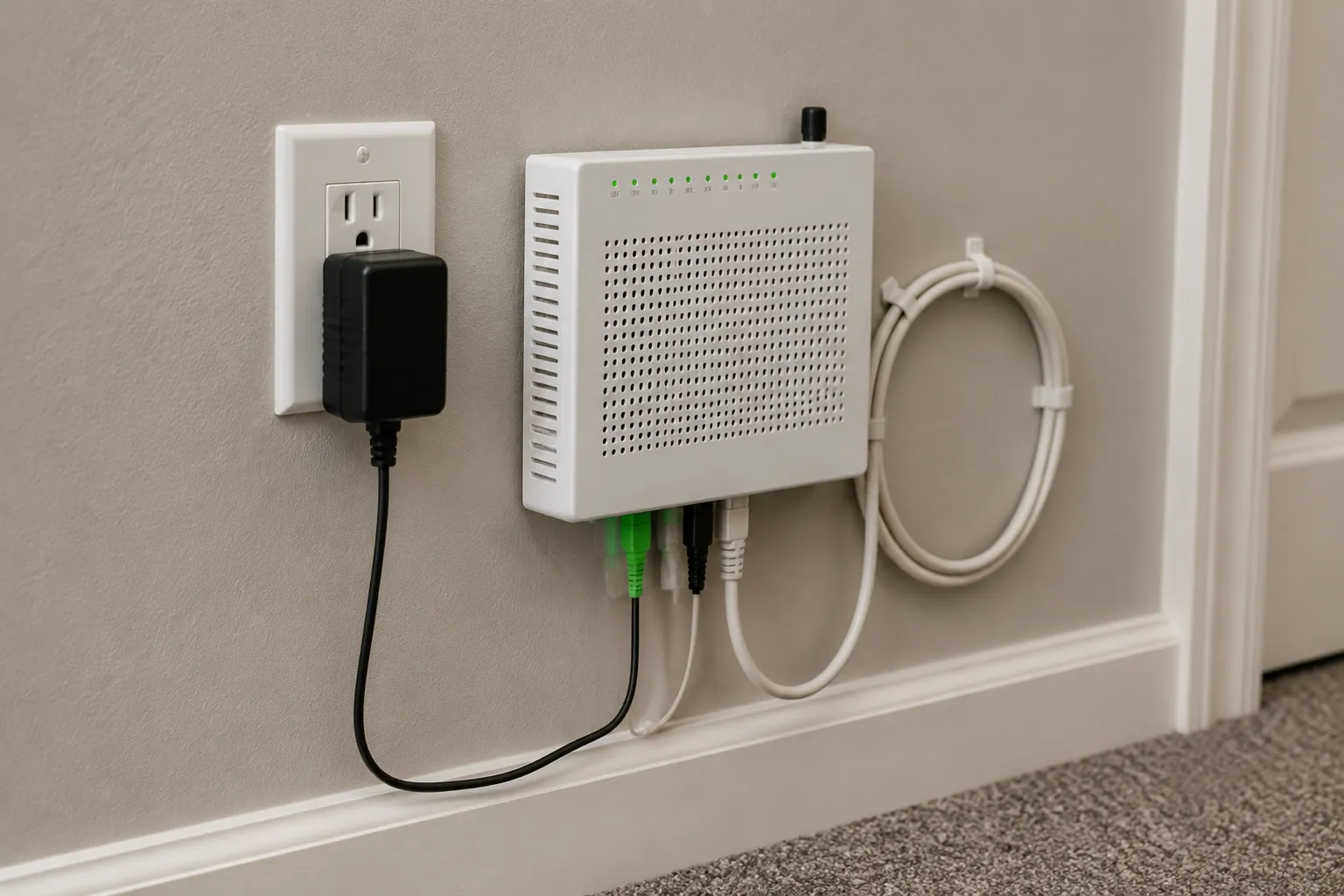
What is the Adtran box plugged into the wall is a common question for homeowners, renters, and small business owners who find a small Adtran box mounted near a wall outlet, router, utility closet, garage wall, or basement internet setup. In most homes, this box is an Adtran ONT, which stands for Optical Network Terminal.
In simple terms, the Adtran box is usually part of your fiber internet service. It receives the fiber-optic signal from your internet service provider, converts it into an Ethernet connection, and sends that connection to your Wi-Fi router. Without it, your router may not be able to access the internet.
It may look like a modem, router, or mystery wall device, but it usually has one important job: helping fiber internet enter your home and work with your home network.
What Is the Adtran Box Plugged Into the Wall?
The Adtran box plugged into the wall is usually an ONT, or Optical Network Terminal. This device is used in many fiber internet installations. It acts as the point where your provider’s fiber network connects to your home.
A traditional cable internet setup often uses a modem. Fiber internet is different. Instead of using coaxial cable, it uses a fiber-optic cable that carries data as light signals. Your devices cannot use those light signals directly, so the Adtran ONT converts them into a usable Ethernet signal.
You may also hear this device called a fiber internet box, fiber modem, network interface device, network termination device, or fiber termination box. These names can be confusing, but they usually point to the same general idea: the box helps bring internet service from the provider’s network into your home.
The box is plugged into the wall because it needs power. If the power adapter is removed or the wall outlet stops working, the ONT may shut off, and your internet connection may stop working.
In many homes, the setup looks like this:
| Connection | What It Does |
| Fiber-optic cable | Brings the provider’s signal into the home |
| Adtran ONT | Converts fiber signal into Ethernet |
| Ethernet cable | Carries internet from the ONT to the router |
| Wi-Fi router | Shares the internet with phones, laptops, TVs, and smart devices |
So, if you see an Adtran wall box, it is probably not random equipment. It is likely an important part of your home internet connection.
Why the Adtran Box Is Installed and How It Works
The Adtran box is installed because fiber internet needs a device that can translate the signal from the provider’s network into something your home network can use. This is why the box is often placed where the fiber cable enters your house, apartment, garage, utility room, hallway closet, or basement.
Think of it as a handoff point. The ISP network ends at the ONT, and your home network begins after it. This point is sometimes called a demarcation point or service demarcation point.
Here is the simple process:
- The fiber-optic cable brings light-based data into your home.
- The Adtran ONT receives that signal.
- The ONT converts the light signal into an electrical Ethernet signal.
- An Ethernet cable connects the ONT to your router’s WAN port or internet port.
- Your router then creates Wi-Fi and wired connections for your devices.
This is why the Adtran box is important. It is not just a power box or random wall device. It is part of the path your internet travels before reaching your phone, laptop, smart TV, gaming console, or office computer.
Some Adtran models may also support phone service, especially if they include an RJ11 or POTS phone jack. In that case, unplugging the box could affect not only your internet but also your home phone or VoIP service.
Is the Adtran Box a Modem, Router, Gateway, or ONT?
Many people call the Adtran box a modem, and that is understandable. It plays a role similar to a modem because it connects your home to the provider’s internet service. However, for fiber internet, the more accurate term is ONT, or Optical Network Terminal.
The difference matters because each device has a different job.
| Device | What It Does | Does It Usually Provide Wi-Fi? |
| ONT | Converts fiber signal into Ethernet | Usually no |
| Modem | Converts cable or DSL signal into internet | Usually no |
| Router | Shares internet with devices | Usually yes |
| Gateway | Combines modem/router functions | Often yes |
An Adtran ONT is not usually the same as a Wi-Fi router. It may bring the internet connection into your home, but it usually does not broadcast Wi-Fi by itself. Your router does that part.
Some Adtran products may work as a gateway or residential gateway, meaning they may combine multiple features in one device. But if your Adtran box is mounted on the wall and connected to a fiber line, it is most likely acting as an ONT.
A simple way to remember it is this:
The ONT brings fiber internet into your home. The router shares that internet with your devices.
So if you are asking, “Is the Adtran box my modem?” the best answer is: kind of, but not exactly. It performs the fiber version of a modem’s job, but technically it is an Optical Network Terminal.
What Cables, Ports, and Wi-Fi Connections Are Involved?
The cables connected to an Adtran box can tell you a lot about what it does. Most wall-mounted Adtran ONTs have a few basic connections: power, fiber, Ethernet, and sometimes phone.
| Cable or Port | Common Label | Purpose |
| Power cable | Power / 12V | Keeps the ONT running |
| Fiber cable | Optical / Fiber | Brings fiber signal into the home |
| Ethernet port | LAN / GE / 10GE | Sends internet to router |
| Phone port | RJ11 / Voice / POTS | Supports landline or VoIP service |
| Router port | WAN / Internet | Receives internet from the ONT |
The Ethernet cable is especially important. It usually runs from the ONT’s LAN port or Gigabit Ethernet port to your router’s WAN port. If this cable is loose, damaged, or plugged into the wrong port, your router may show “connected” but still have no internet.
Some models may include labels like 10GE port, 1GbE, RJ45, or 10/100/1000BASE-T. These are technical terms for Ethernet connection types and speeds. You do not need to memorize them, but they help explain why the ONT is part of your internet equipment.
If there is a phone cable, it may use an RJ11 port. That port can support Plain Old Telephone Service, also called POTS, or another form of home phone service.
The important point is that the Adtran box usually does not create Wi-Fi by itself. It normally sends internet to your router, and the router handles Wi-Fi coverage throughout the home.
Does the Adtran Box Provide Wi-Fi?
In most homes, the Adtran box does not provide Wi-Fi. It provides the internet connection that your Wi-Fi router uses.
This is one of the most common misunderstandings. A person may see the Adtran box plugged into the wall and assume it is the router. But if your phones, laptops, tablets, and smart TVs connect to a separate device with a Wi-Fi name and password, that separate device is probably your router or mesh Wi-Fi system.
The Adtran ONT usually handles the fiber connection. The router handles your local network, Wi-Fi signal, device connections, parental controls, and sometimes firewall settings.
If your ONT lights look normal but your Wi-Fi is not working, the issue may be with the router rather than the Adtran box. For example, the ONT may have internet service, but the router may need to be restarted, reconnected, or replaced.
A simple test is to check the Ethernet cable between the ONT and router. Make sure it is firmly connected from the ONT’s LAN port to the router’s WAN port. If that cable is loose, the router may not receive internet even if the Adtran box is working correctly.
Can You Unplug, Move, or Replace the Adtran Box?
You can unplug the power cable from the Adtran box, but you should understand what will happen first. If you unplug the power, the ONT will usually turn off. That means your fiber internet, router connection, and possibly phone service may stop working.
Sometimes an ISP support agent may ask you to reboot the ONT by unplugging the power cable for 15 seconds or 30 seconds, then plugging it back in. That type of power cycle is usually safe when done correctly. However, you should avoid unplugging the fiber cable unless your provider specifically tells you to do it.
Fiber connectors can be sensitive. Dust, bending, pulling, or damage can cause signal loss. You should not look into a fiber connector or optical port, and you should not bend the fiber cable sharply.
Moving the box is a different matter. You should not move or remove an Adtran wall box without contacting your internet service provider. The ONT may be ISP-owned equipment, and it may need to stay in a specific location where the fiber enters the home.
Replacing the Adtran box with your own router is also usually not possible. You may be able to use your own router with the ONT, but the ONT itself is normally provisioned by the provider. In other words, your router can connect to the ONT, but it usually cannot replace it.
If you are renovating, painting, moving furniture, or selling a house with an existing ONT, call the provider before changing anything.
What Do the Lights on an Adtran Box Mean?
The lights on an Adtran box help show whether the ONT has power, fiber signal, Ethernet connection, and phone service. Exact labels vary by model, but many Adtran ONTs use lights such as Power, Fiber, Optical, PON, LAN, Voice, or Alarm.
| Light | Normal Meaning | Possible Problem |
| Power LED | The box has power | No light may mean outlet, adapter, or power issue |
| Fiber / Optical / PON light | Fiber signal is active | Off or red may mean no optical signal |
| LAN / Ethernet light | Router is connected | Off may mean loose Ethernet cable |
| Voice LED | Phone line is active or ready | Off may mean no phone service |
| Alarm light | Usually off | Red may mean a fault or service issue |
A solid green light often means normal operation. A blinking green light may mean activity or connection negotiation. A red alarm light, blinking red light, or fiber light that is off may point to a problem that needs provider support.
If the Power LED is off, check the wall outlet, power adapter, and power strip if one is being used. If the LAN light is off, check the Ethernet cable between the ONT and router. If the Fiber, Optical, or PON light is red or off, the problem may be on the fiber side, and you may need to contact your ISP.
Do not panic over every blinking light. Some blinking is normal. The key is whether the internet works and whether warning lights such as Alarm or LOS are red.
Common Adtran Box Problems and Simple Troubleshooting Steps
If your internet is down, the Adtran box is one of the first things to check. However, not every internet problem is caused by the ONT. Sometimes the issue is the router, Ethernet cable, Wi-Fi settings, power outlet, or an area outage.
Here is a simple troubleshooting table:
| Problem | Possible Cause | What to Check First |
| No lights on ONT | No power | Check wall outlet and power adapter |
| Red alarm light | ONT or fiber fault | Contact your ISP |
| Fiber light off | No optical signal | Check for service outage |
| LAN light off | Router or Ethernet issue | Check Ethernet cable and WAN port |
| Wi-Fi not working | Router issue | Restart router |
| Internet down but lights normal | Router, account, or ISP issue | Check router and provider outage status |
Start with the basics. Make sure the box is plugged into a working power outlet. Check that the power adapter is secure. Then check the Ethernet cable from the ONT to the router. It should usually go into the router’s WAN or Internet port.
Next, restart the router. Many home internet problems are router-related, especially when the ONT lights look normal. If your ISP recommends it, you can also power cycle the ONT by unplugging the power for a short time and plugging it back in.
Avoid pressing the factory reset button unless your provider tells you to. A random factory reset can erase settings or interrupt service.
If you see a red fiber, optical, PON, LOS, or alarm light, the issue may be outside your home or on the provider’s fiber network. In that case, call your ISP rather than trying to fix the fiber line yourself.
Who Owns the Adtran Box and When Should You Call Your ISP?
The Adtran ONT is often installed, activated, and managed by the internet service provider. In many cases, it is provider-owned equipment or ISP-owned equipment, even if it is mounted inside your home.
That means you should not remove it, sell it, throw it away, or replace it without checking with your provider. Some providers may charge an unreturned equipment fee if required equipment is missing after service cancellation.
You should call your ISP if the box has no power after checking the outlet, the fiber light is red or off, the alarm light is red, the fiber cable is damaged, or the unit needs to be moved. You should also call if you moved into a home with an existing Adtran box and want to activate service.
Renters should be extra careful. If the box was already in the apartment or rental house, it may belong to the internet provider, landlord, or previous service setup. Removing it could create problems for future service activation.
A good rule is simple: you can restart your router and check loose cables, but you should call the ISP for fiber, optical, alarm, activation, ownership, or relocation issues.
Is the Adtran Box Safe to Leave Plugged In?
Yes, the Adtran box is generally safe to leave plugged in. It is designed to run continuously, often 24/7, because your internet service depends on it. Like other networking equipment, it should stay powered, dry, and well ventilated.
However, you should treat it with basic care. Do not cover it with heavy furniture, blankets, boxes, or insulation. Avoid placing it where water can reach it. Do not open the box, remove fiber connectors, or bend the fiber cable sharply.
Some fiber equipment may include optical safety language such as Class 1 Laser Product. This does not mean the box is dangerous during normal use. It means users should not tamper with optical parts or look into fiber connectors.
If your area has frequent power surges, a surge protector or UPS battery backup may help protect your ONT and router. A UPS can also keep the ONT and router running briefly during a power outage, but both devices usually need backup power for the internet to keep working.
If the box becomes unusually hot, smells burnt, cracks, gets wet, or makes unusual noises, unplugging power may be appropriate for safety, but contact your provider immediately.
FAQs About the Adtran Box Plugged Into the Wall
Is the Adtran box my modem?
The Adtran box is usually not a traditional modem. It is more accurately an ONT, or Optical Network Terminal. It performs a similar role for fiber internet by converting the provider’s fiber signal into Ethernet for your router.
Does the Adtran box need to stay plugged in?
Yes. The box usually needs to stay plugged into a power outlet so your fiber internet can work. If you unplug it, your internet and possibly home phone service may stop.
Why is my Adtran box blinking?
Some blinking lights are normal and may show data activity. However, a red alarm light, fiber light off, or optical light problem may mean there is a service issue.
Can I connect my router directly to the Adtran box?
Yes, in most setups the router connects directly to the Adtran ONT using an Ethernet cable. The cable usually goes from the ONT’s LAN port to the router’s WAN port.
Can I use my own router with an Adtran ONT?
Often, yes. Many users can connect a third-party router to the ONT, but compatibility can depend on your provider’s settings, service plan, and provisioning rules.
What if I moved into a house with an existing Adtran box?
Do not remove it. Contact your internet provider or landlord. The box may already be connected to a fiber line and may be needed for service activation.
Should I remove the Adtran box if I cancel service?
Not without asking the provider. Some ONTs are provider-owned, and removing equipment without permission may cause fees or installation issues later.
Can a power outage stop the Adtran box from working?
Yes. The ONT needs power. During an outage, internet usually stops unless both the ONT and router are connected to backup power, such as a UPS battery backup.
Conclusion
The Adtran box plugged into the wall is usually your home’s fiber internet ONT, also called an Optical Network Terminal. It converts the fiber signal from your ISP into an Ethernet connection your router can use.
In most cases, you should leave the Adtran ONT plugged in, avoid moving or opening it, and keep the fiber cable protected. If the lights show a problem, your router has no internet, or you need the box moved, contact your internet provider. The box may look confusing at first, but it is simply one of the most important parts of your fiber internet setup.